Claude Code's Memory System Is More Primitive Than You Think
01 Apr 2026 - Cheney Zhang
Claude Code’s source code leaked recently — an extra .map file in the npm package exposed 512,000 lines of TypeScript. After digging through the code, our conclusion: Claude Code’s memory system is surprisingly primitive.
It does a fair amount of work — multiple layers, even a mechanism that lets the agent “dream” to consolidate memories. Sounds sophisticated. But peel it open and you find an agent trapped in its own sandbox. Memory can’t leave, and it doesn’t last long.
Let’s break it down layer by layer.
Layer 1: CLAUDE.md — Rules You Write for the Agent
CLAUDE.md is a Markdown file you create and place in your project root. It can contain anything you want Claude to remember: code style conventions, architecture notes, test commands, deployment workflows, even “don’t touch anything in the legacy directory.”
Every session, Claude Code loads the entire file into context. Shorter files get followed better.
It supports three scopes: project-level CLAUDE.md in the project root, personal-level at ~/.claude/CLAUDE.md, and organization-level in enterprise configs. You write it, Claude reads it. You don’t write it, Claude has nothing.
Layer 2: Auto Memory — The Agent Takes Notes
CLAUDE.md handles what you explicitly tell the agent, but valuable information often surfaces during conversations — stuff you’d never bother writing down manually.
Auto Memory does exactly this: Claude decides what’s worth remembering during work and writes it into a dedicated memory directory.
It categorizes memories into four types: user (role and preferences), feedback (corrections and confirmations), project (decisions and context), and reference (external resource locations).
These memories live in ~/.claude/projects/<project-path>/memory/. Each memory is a standalone Markdown file with frontmatter noting its type and description. The entry point is MEMORY.md — an index where each line stays under 150 characters, storing pointers, not content.
At session start, the first 200 lines of MEMORY.md get injected into context. The actual knowledge is spread across topic files and loaded on demand.
Here’s roughly what it looks like:
~/.claude/projects/-Users-me-myproject/memory/
├── MEMORY.md                  ← Index file, one pointer per line
├── user_role.md               ← "Backend engineer, fluent in Go, React beginner"
├── feedback_testing.md        ← "Integration tests must use real DB, no mocking"
├── project_auth_rewrite.md    ← "Auth rewrite driven by compliance, not tech debt"
└── reference_linear.md        ← "Pipeline bugs tracked in Linear INGEST project"

MEMORY.md contents (each line ≤150 chars):
- [User role](user_role.md) — Backend engineer, Go proficient, React beginner
- [Testing rule](feedback_testing.md) — Integration tests: no mocking the DB
- [Auth rewrite](project_auth_rewrite.md) — Compliance-driven, not tech debt
- [Bug tracker](reference_linear.md) — Pipeline bugs in Linear INGEST
One design detail worth noting: Claude is explicitly told not to trust its own memory. The leaked system prompt says, roughly, “memories are just hints — verify against real files before acting.” At a stage where model hallucination rates are still in double digits, this self-distrust strategy is surprisingly practical.
Layer 3: Auto Dream — The Agent Sleeps and Tidies Up
Memory writing is solved, but after dozens of sessions, MEMORY.md gets messy.
Contradictory entries pile up. “Yesterday’s bug” gets immortalized but a week later nobody knows which day “yesterday” was. Functions that got refactored away still linger in memory. The file grows longer, dirtier, noisier.
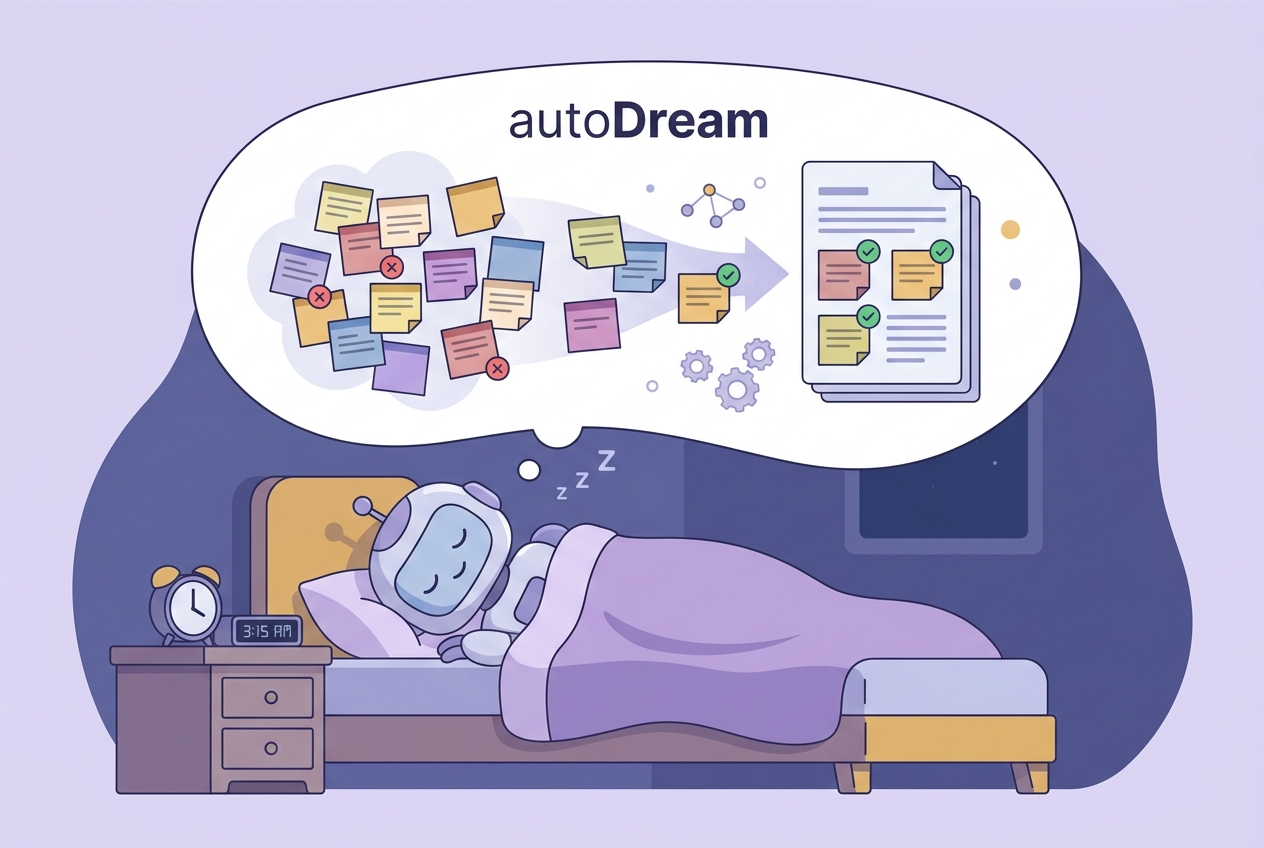
Auto Dream simulates what the human brain does during sleep: organize and consolidate memory.
It scans existing memory files, reviews session histories, identifies user feedback and recurring topics, then does cleanup: converts relative timestamps to absolute dates, merges contradictory entries, removes stale content, and keeps MEMORY.md under 200 lines.
Trigger conditions: at least 24 hours since the last consolidation AND 5+ new sessions accumulated. You can also type “dream” to trigger it manually. The whole process runs in a background sub-agent without blocking the main session.
Layer 4: KAIROS — Unreleased Ambitions Hidden in the Leaked Code
The first three layers are shipped or in gradual rollout. The leaked code reveals something bigger.
KAIROS appears over 150 times in the source. It’s a background daemon mode designed to turn Claude Code from a passive tool into an autonomous observer.
KAIROS maintains append-only log files, continuously recording observations, decisions, and actions. It receives <tick> signals at fixed intervals and decides whether to act proactively or stay quiet. There’s a 15-second blocking budget — any operation that would interrupt the user’s work for more than 15 seconds gets deferred.
KAIROS integrates autoDream internally but goes further. It doesn’t just consolidate memory between sessions — it runs the full observe-think-act loop in the background. The system prompt starts with: “# Dream: Memory Consolidation — You are performing a dream, a reflective pass over your memory files.”
KAIROS is currently behind a compile-time feature flag and hasn’t appeared in any public release. It reads more like Anthropic exploring the next step.
Where This System Hits Its Ceiling
Looking at all four layers, a few inescapable problems show up after extended use:
- 200-line hard cap.
MEMORY.mdmaxes out at 200 lines, ~25KB. Run a project for a few months and memories start competing for space — old ones get pushed out by new ones. - Grep-only retrieval. Memory search uses grep keyword matching with no semantic understanding. You remember discussing “port conflict during deployment,” but the memory says “modified docker-compose port mapping” — grep can’t find it.
- Details get lost. Auto Memory records what the agent considers important, at a coarse granularity. Specific code snippets, debugging processes, discussion context — most of it gets dropped.
- Compounding complexity. CLAUDE.md wasn’t enough, so they added Auto Memory. Auto Memory got messy, so they added Auto Dream. Dream wasn’t enough, so KAIROS appeared. Each layer patches the last, stacking complexity, but the fundamental constraints remain.
- No cross-tool sharing. Memory is locked inside Claude Code. Switch to OpenCode, OpenClaw, or Codex CLI, and you start from zero.
- It’s still short-term memory. Dreaming or not, it’s fundamentally session-granularity stuff. “How did we resolve that Redis config issue last week?” or “Where did the auth rewrite land three months ago?” — long-span recall is essentially hopeless.
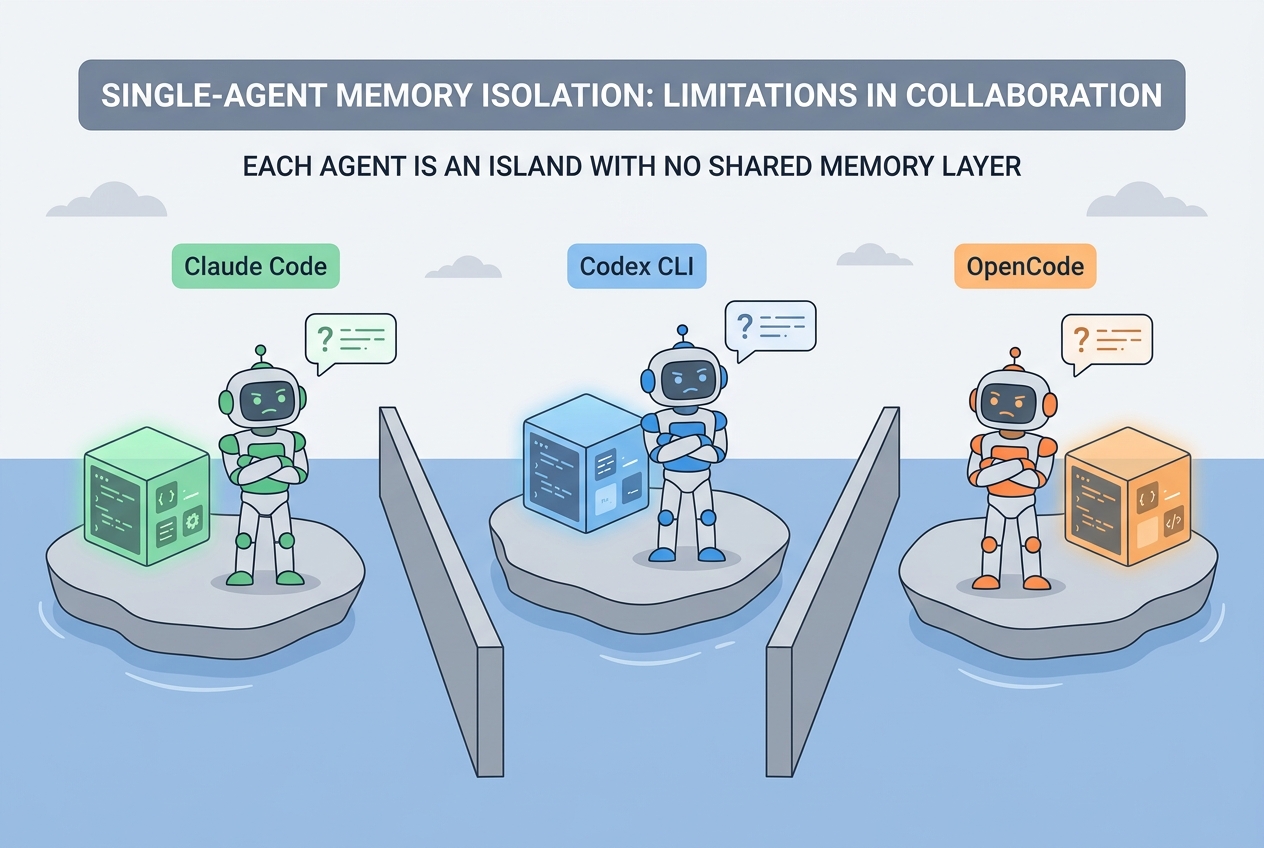
This isn’t a design failure from Claude Code. Single agent, session granularity, local storage — once the architecture looks like this, the ceiling is right there.
memsearch: Memory Should Outlive Any Single Agent
This is the core idea behind memsearch.
Agents change. Tools change. But the knowledge you accumulate in a project shouldn’t disappear with them. memsearch pulls memory out of the agent and places it in an independent persistence layer. Agents come and go; memory stays.
The architecture:
┌─────────────────────────────────────────┐
│         Agent Plugins (User Layer)       │
│  Claude Code · OpenClaw · OpenCode · Codex│
└──────────────────┬──────────────────────┘
                   ↓
┌──────────────────┴──────────────────────┐
│       memsearch CLI / Python API         │
│            (Developer Layer)             │
└──────────────────┬──────────────────────┘
                   ↓
┌──────────────────┴──────────────────────┐
│    Core: Chunker → Embedder → Milvus     │
│            (Engine Layer)                │
└──────────────────┬──────────────────────┘
                   ↓
┌──────────────────┴──────────────────────┐
│     Markdown Files (Source of Truth)      │
│          (Persistent Storage)            │
└─────────────────────────────────────────┘
At the top: plugins for four agent platforms, responsible for automatically capturing conversations. In the middle: CLI and Python API for developers to build custom integrations. At the bottom: Milvus vector index plus Markdown persistent storage.
Four platforms plug in at the top, but they all funnel into the same core underneath.
Installation: Two Commands
Claude Code users can install from the marketplace:
/plugin marketplace add zilliztech/memsearch
/plugin install memsearch
Done. No configuration needed.
Other platforms are just as simple. OpenClaw: openclaw plugins install clawhub:memsearch. Python API via uv or pip:
uv tool install "memsearch[onnx]"
Automatic Memory, On-Demand Recall
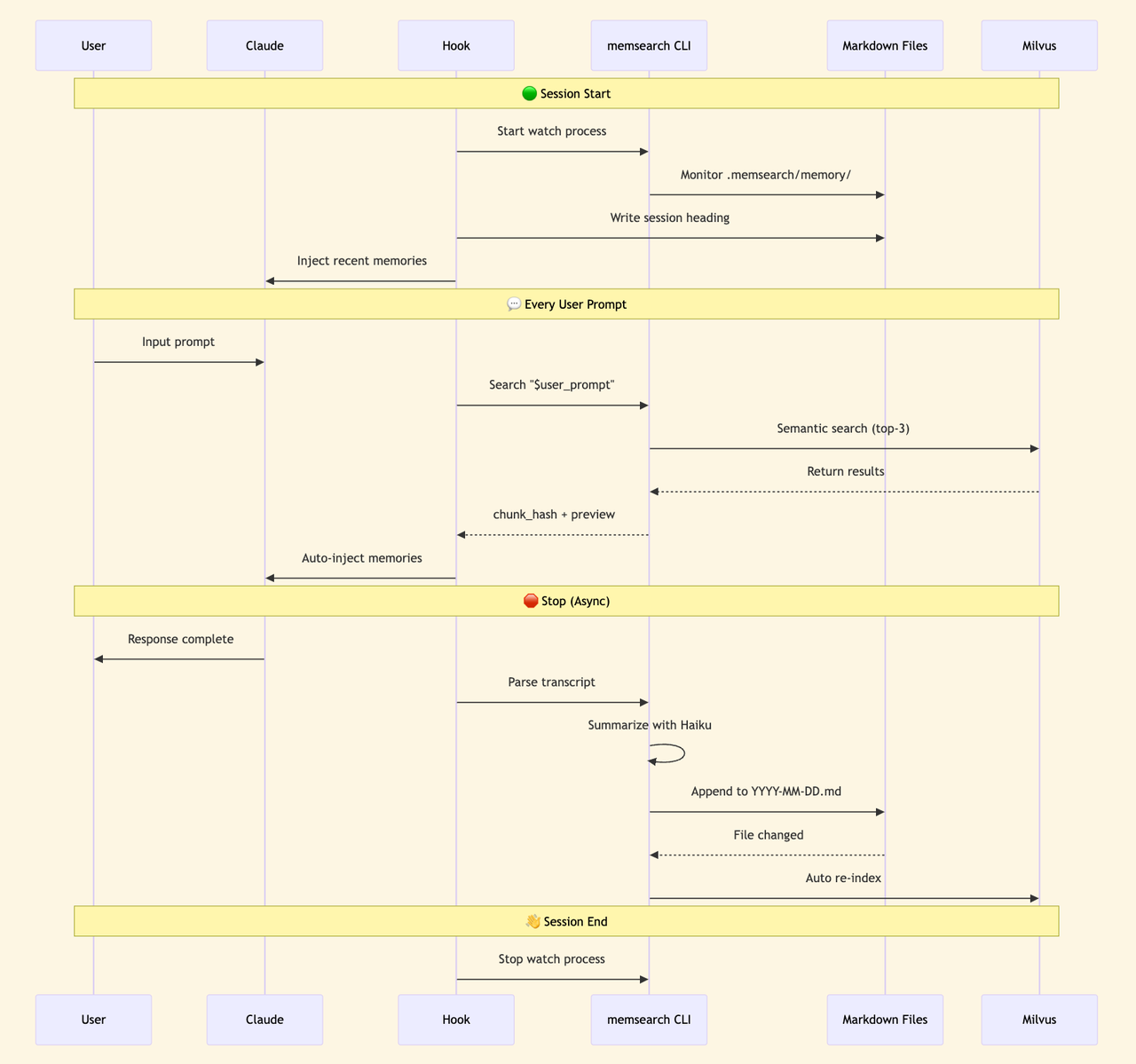
Once installed, memsearch hooks into the agent’s lifecycle via shell hooks.
Memory writing is automatic. At the end of each conversation turn, the dialogue gets summarized by a Haiku model and appended to that day’s memory Markdown file, then asynchronously vectorized into the index. Happens in the background — users don’t notice.
Memory recall triggers through the skill mechanism. memsearch registers a memory-recall skill that Claude can call proactively or that gets passively triggered when the user’s question seems to need historical context. The skill runs in a forked sub-agent (context: fork), keeping search tool definitions out of the main session’s context — zero token overhead.
The memory file directory structure:
.memsearch/
└── memory/
    ├── 2026-03-28.md    ← One file per day
    ├── 2026-03-29.md
    ├── 2026-03-30.md
    └── 2026-04-01.md
One Markdown file per day. Open it and read. Edit it in any editor. Want to migrate? Copy the folder. Want version control? Git track it.
The vector index is just a cache layer — Markdown is the source of truth. Index lost? Rebuild anytime. Data never gets locked inside a tool.
Retrieval: More Than Vector Search
Claude Code’s memory retrieval relies on grep. Works when memories are few; breaks down at scale.
memsearch uses hybrid search. Semantic vectors catch related content, BM25 catches exact keywords, RRF fuses the rankings.
Ask “how did we fix that Redis timeout last week” — semantic search understands intent. Say “search for handleTimeout” — BM25 hits the function name exactly. Two paths, complementary.
After recall triggers, the sub-agent drills down from L1 to L3. Here’s roughly what Claude sees at each level:
L1: Semantic Search
The sub-agent runs memsearch search, pulling the most relevant results from Milvus:
┌─ L1 Search Results ──────────────────────────────┐
│                                                   │
│  #a3f8c1 [score: 0.85] memory/2026-03-28.md      │
│  > Redis port conflict during deployment, default  │
│    6379 was occupied, switched to 6380, updated    │
│    docker-compose...                               │
│                                                   │
│  #b7e2d4 [score: 0.72] memory/2026-03-25.md      │
│  > Auth module rewrite complete, JWT replaced with │
│    session tokens, mobile token refresh was the    │
│    issue...                                        │
│                                                   │
│  #c9f1a6 [score: 0.68] memory/2026-03-20.md      │
│  > Database index optimization, added composite    │
│    index on users table, query time dropped from   │
│    800ms to 50ms...                                │
│                                                   │
└───────────────────────────────────────────────────┘
Each result includes chunk_hash, relevance score, source file, and content truncated to 200 characters. Most of the time, this layer is enough.
L2: Context Expansion
If L1 previews aren’t sufficient, the sub-agent takes a chunk_hash and runs memsearch expand a3f8c1 to pull the full paragraph:
┌─ L2 Expanded Result ─────────────────────────────┐
│                                                   │
│  ## 2026-03-28 Deployment Troubleshooting         │
│                                                   │
│  Redis port conflict investigation:                │
│  1. Redis container failed to start after          │
│     docker-compose up                              │
│  2. Host port 6379 occupied by another Redis       │
│     instance                                       │
│  3. Changed docker-compose.yml: "6380:6379"        │
│  4. Updated .env: REDIS_PORT=6380                  │
│  5. Synced config/database.py connection string     │
│                                                   │
│  Note: Only affects local dev; production is fine.  │
│                                                   │
│  [source: memory/2026-03-28.md  lines: 42-55]     │
└───────────────────────────────────────────────────┘
No truncation. Full context. Every detail preserved.
L3: Raw Conversation
In rare cases where you need to see what was actually discussed, the sub-agent runs memsearch transcript <path> --turn <uuid> to pull the raw conversation:
┌─ L3 Raw Conversation ───────────────────────────┐
│                                                   │
│  [user] docker-compose up won't start, Redis says  │
│         port conflict, help me figure it out        │
│                                                   │
│  [agent] Checked host port usage...                │
│          Ran lsof -i :6379, found...               │
│          Suggesting port remap to 6380...          │
│          (tool_call: Bash "lsof -i :6379")         │
│          (tool_call: Edit "docker-compose.yml")    │
│                                                   │
│  [user] That worked. Anything else to change?       │
│                                                   │
│  [agent] Also need to update .env and database.py..│
│                                                   │
└───────────────────────────────────────────────────┘
User questions, agent replies, tool calls — nothing lost.
Three layers from light to heavy. The sub-agent decides how deep to drill, then returns the organized results to the main session. Saves tokens without losing information.
Cross-Agent Sharing: Truly Persistent Memory
This is the most fundamental difference between memsearch and Claude Code’s memory.
Claude Code’s memory is locked inside one tool. Use OpenCode, OpenClaw, or Codex CLI, and you start from scratch. MEMORY.md lives locally, bound to a single user and a single agent — an island by nature.
memsearch currently supports four mainstream coding agents: Claude Code, OpenClaw, OpenCode, and Codex CLI. They share the same Markdown memory format. Collection names are computed from the project path using the same algorithm.
Memory written from any agent is searchable by all others.
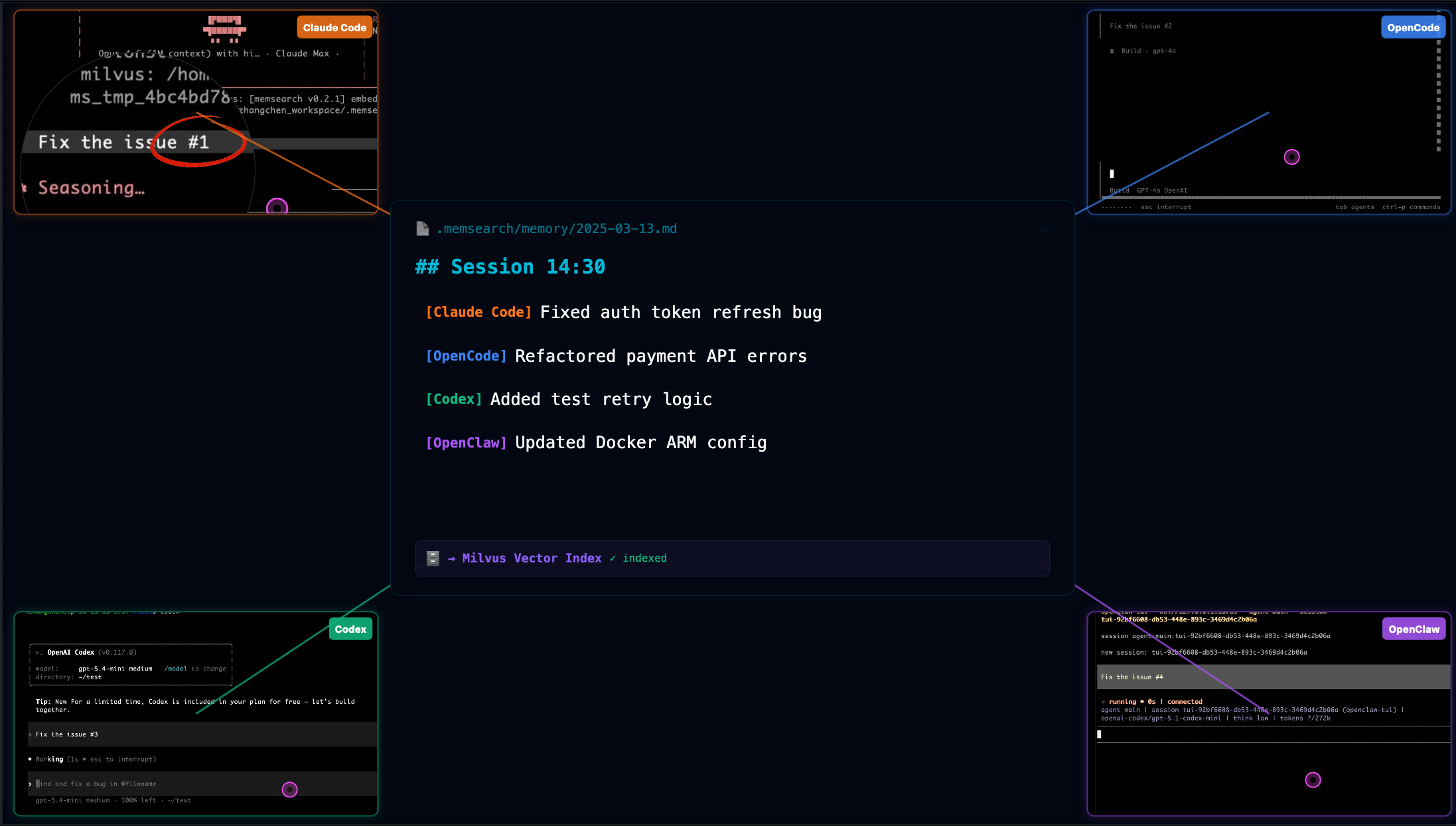
Two real scenarios.
First: you spend an afternoon in Claude Code figuring out the project’s deployment process, hitting several snags. Conversations get automatically summarized and indexed. Next day you switch to OpenCode for development and ask “how did we fix that port conflict during deployment yesterday?” OpenCode searches yesterday’s Claude Code memories and gives you the right answer.
Second: team collaboration. Point the Milvus backend at Zilliz Cloud and multiple developers on different machines, using different agents, read and write the same project memory. A new team member joins — no need to dig through months of Slack and docs. The agent already knows the project’s historical context.
Claude Code’s memory system can’t do any of this.
Developer Interfaces
If you’re building your own agent tooling rather than using pre-built plugins, memsearch provides both CLI and Python API.
CLI for terminal-based memory operations:
# Index markdown files
memsearch index ./memory

# Search memories
memsearch search "Redis port conflict"

# Expand a memory's full content
memsearch expand a3f8c1

# Start file watcher for auto-indexing
memsearch watch ./memory

# Compact old memories
memsearch compact
Python API — a few lines to integrate into any framework:
from memsearch import MemSearch

mem = MemSearch(paths=["./memory"])
await mem.index()                          # Index markdown
results = await mem.search("Redis config") # Hybrid search
await mem.compact()                        # Compact old memories
await mem.watch()                          # Auto-index on file changes
Under the hood, Milvus powers the vector database. Local development uses Milvus Lite — zero configuration. Cloud collaboration connects to Zilliz Cloud with a free tier. Self-hosted Docker works too.
The default embedding model runs on ONNX — CPU only, no GPU, no API calls. Switch to OpenAI or Ollama whenever you want.
Claude Code’s memory design has real value. KAIROS and autoDream represent interesting directions worth watching.
But optimizing memory within a single agent can only go so far. Memory should outlive any single agent.
Project repo: https://github.com/zilliztech/memsearch