I Built an AI Agent That Watches the Market While I Sleep
05 Mar 2026 - Cheney Zhang
I have a full-time job and no time to watch the stock market all day. But I still trade — mostly US tech stocks. Last year I made at least three bad decisions because I was too tired or too rushed to think clearly. So I built an AI agent to do the watching for me.
The stack: OpenClaw as the agent framework, Exa for information gathering, and Milvus as a personal memory store. Total cost: about $20/month.
The NVIDIA Moment
Let me start with the moment that convinced me this was worth it.
On February 26th, NVIDIA reported Q4 earnings — revenue up 65% year-over-year. The stock dropped 5.5%. I didn’t find out until the next morning.
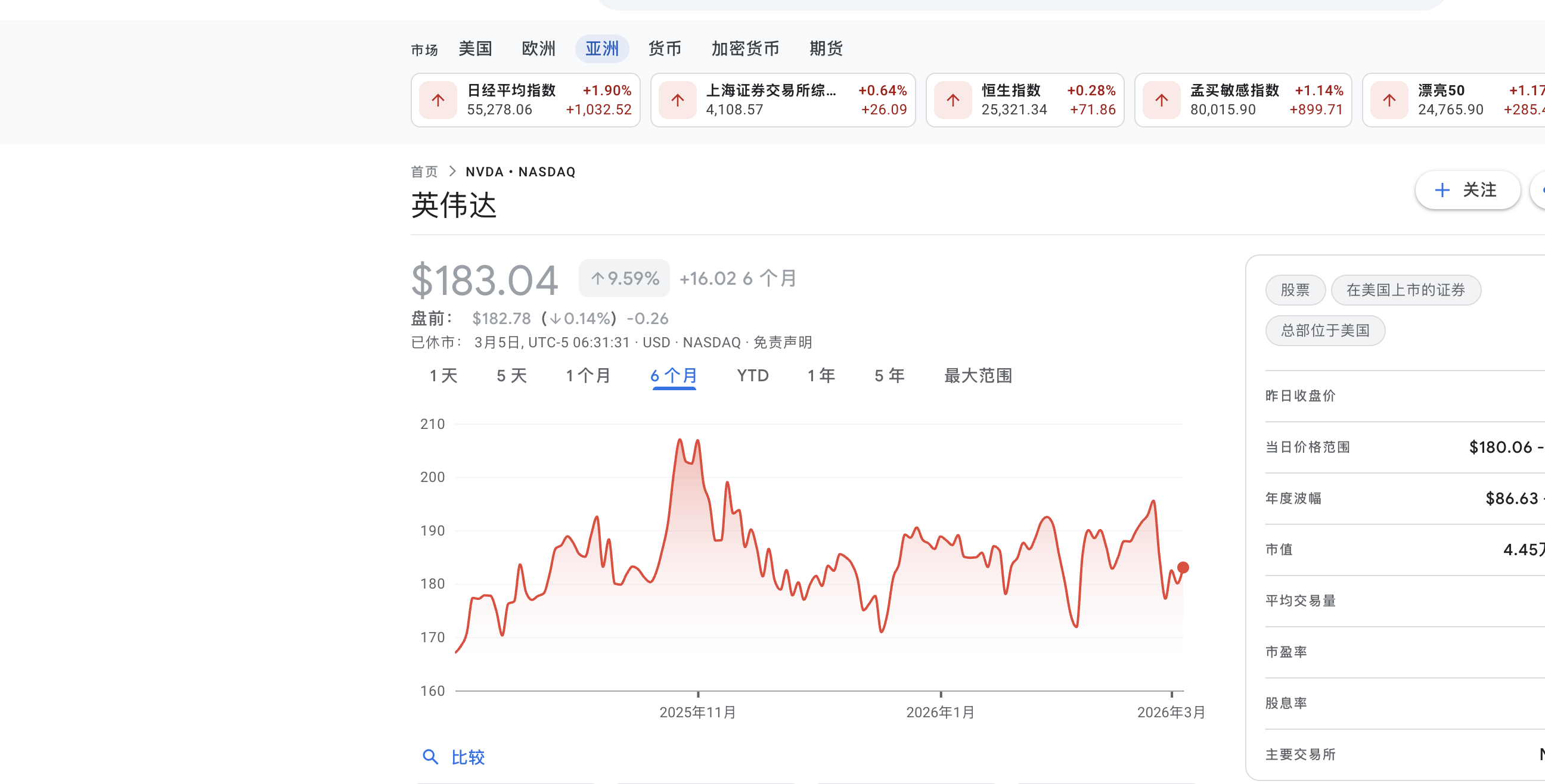
But when I checked my phone, there was already a message from my agent, sent the previous evening:
NVDA earnings analysis: Revenue beat expectations, but the market is skeptical about AI capex sustainability. In similar past situations, the stock tended to drop short-term. You had a similar experience in September 2024 — you panic-sold and the stock recovered within three weeks. Recommendation: hold, don’t panic-sell.
It didn’t just analyze the earnings report. It pulled up my own past trading notes and reminded me not to repeat the same mistake.
Back in September 2024, NVIDIA dropped 9%. I sold in a panic. Three weeks later the price came back. That cost me about 12%. This time, the agent caught me before I could do it again.
Information Gathering with Exa
The first problem to solve: where does the information come from?
I used to spend hours scrolling through financial news apps. I tried writing scrapers, but financial sites update their anti-bot measures constantly. I needed something stable that I didn’t have to maintain.
Exa is a search API designed for AI agents. The key difference from Google: it does semantic search. You describe what you’re looking for in plain language, and it understands what you mean. The index refreshes every minute, and it filters out SEO spam automatically.
Here’s the basic usage:
from exa_py import Exa

exa = Exa(api_key="your-api-key")

# Semantic search — describe what you want in plain language
result = exa.search(
    "Why did NVIDIA stock drop despite strong Q4 2026 earnings",
    type="neural",          # semantic search, not keyword
    num_results=10,
    start_published_date="2026-02-25",
    contents={
        "text": {"max_characters": 3000},       # get full article text
        "highlights": {"num_sentences": 3},     # key sentences
        "summary": {"query": "What caused the stock drop?"}  # AI summary
    }
)

for r in result.results:
    print(f"[{r.published_date}] {r.title}")
    print(f"  Summary: {r.summary}")
    print(f"  URL: {r.url}\n")
The contents parameter is the killer feature — it doesn’t just return links. It extracts the full text, highlights key sentences, and generates a summary, all in one request.
You can also filter by source type, find similar articles given a URL, or run deep searches that synthesize information across multiple sources:
# Only financial reports from trusted sources
earnings = exa.search(
    "NVIDIA Q4 2026 earnings analysis",
    category="financial report",
    num_results=5,
    include_domains=["reuters.com", "bloomberg.com", "wsj.com"],
    contents={"highlights": True}
)

# Find more analysis like a specific article
similar = exa.find_similar(
    url="https://fortune.com/2026/02/25/nvidia-nvda-earnings-q4-results",
    num_results=10,
    start_published_date="2026-02-20",
    contents={"text": {"max_characters": 2000}}
)
I built about a dozen search templates covering everything I track: Fed policy, tech earnings, oil prices, macro liquidity. They run automatically every morning, and the results show up on my phone.
Personal Memory with Milvus
Information gathering solves “what’s happening out there.” But making good decisions also requires knowing yourself — what you got right, what you got wrong, what your blind spots are.
This is where Milvus comes in. It’s a vector database: you convert text into numerical vectors and store them. When you search later, it finds results by meaning, not keywords. So “Middle East conflict tanks tech stocks” and “geopolitical tensions trigger semiconductor selloff” — completely different words, but Milvus knows they’re about the same thing.
I set up three collections for different types of personal knowledge:
from pymilvus import MilvusClient, DataType
from openai import OpenAI

milvus = MilvusClient("./my_investment_brain.db")
llm = OpenAI()

def embed(text: str) -> list[float]:
    return llm.embeddings.create(
        input=text, model="text-embedding-3-small"
    ).data[0].embedding

# Collection 1: past decisions and lessons
milvus.create_collection(
    "decisions",
    dimension=1536,
    auto_id=True
)

# Collection 2: my preferences and biases
milvus.create_collection(
    "preferences",
    dimension=1536,
    auto_id=True
)

# Collection 3: market patterns I've observed
milvus.create_collection(
    "patterns",
    dimension=1536,
    auto_id=True
)
Storing Memories Automatically
Manually logging every insight would be tedious. So I wrote a memory extractor that runs after every conversation with the agent. It pulls out anything worth remembering — decisions, preferences, patterns, lessons — and stores them automatically:
import json

def extract_and_store_memories(conversation: list[dict]) -> int:
    """
    After each chat session, extract personal insights
    and store them in Milvus automatically.
    """
    extraction_prompt = """
    Analyze this conversation and extract any personal investment insights.
    Look for:
    1. DECISIONS: specific buy/sell actions and reasoning
    2. PREFERENCES: risk tolerance, sector biases, holding patterns
    3. PATTERNS: market observations, correlations the user noticed
    4. LESSONS: things the user learned or mistakes they reflected on

    Return a JSON array. Each item has:
    - "type": one of "decision", "preference", "pattern", "lesson"
    - "content": the insight in 2-3 sentences
    - "confidence": how explicitly the user stated this (high/medium/low)

    Only extract what the user clearly expressed. Do not infer or guess.
    If nothing relevant, return an empty array.
    """

    response = llm.chat.completions.create(
        model="gpt-4o",
        messages=[
            {"role": "system", "content": extraction_prompt},
            *conversation
        ],
        response_format={"type": "json_object"}
    )

    memories = json.loads(response.choices[0].message.content)
    stored = 0

    for mem in memories.get("items", []):
        if mem["confidence"] == "low":
            continue    # skip uncertain inferences

        collection = {
            "decision": "decisions",
            "lesson": "decisions",
            "preference": "preferences",
            "pattern": "patterns"
        }.get(mem["type"], "decisions")

        # Check for duplicates — don't store the same insight twice
        existing = milvus.search(
            collection,
            data=[embed(mem["content"])],
            limit=1,
            output_fields=["text"]
        )

        if existing[0] and existing[0][0]["distance"] > 0.92:
            continue    # too similar to existing memory, skip

        milvus.insert(collection, [{
            "vector": embed(mem["content"]),
            "text": mem["content"],
            "type": mem["type"],
            "source": "chat_extraction",
            "date": "2026-03-05"
        }])
        stored += 1

    return stored
The key detail: it only stores things I explicitly said, skipping low-confidence inferences. And it deduplicates before inserting — if something with similarity above 0.92 already exists, it skips the insert.
Retrieval: Bringing My Experience to Every Analysis
When the agent analyzes a current market situation, it first searches my memory store for relevant past experiences:
def recall_my_experience(situation: str) -> dict:
    """
    Given a current market situation, retrieve my relevant
    past experiences, preferences, and observed patterns.
    """
    query_vec = embed(situation)

    past_decisions = milvus.search(
        "decisions", data=[query_vec], limit=3,
        output_fields=["text", "date", "tag"]
    )
    my_preferences = milvus.search(
        "preferences", data=[query_vec], limit=2,
        output_fields=["text", "type"]
    )
    my_patterns = milvus.search(
        "patterns", data=[query_vec], limit=2,
        output_fields=["text"]
    )

    return {
        "past_decisions": [h["entity"] for h in past_decisions[0]],
        "preferences": [h["entity"] for h in my_preferences[0]],
        "patterns": [h["entity"] for h in my_patterns[0]]
    }
That’s why the NVIDIA alert at the beginning of this post referenced my trading history from a year ago. The agent found that lesson in my own notes and surfaced it at exactly the right moment.
Analysis Framework: Writing My Logic as a Skill
Having information and memory isn’t enough if the agent just gives generic, wishy-washy analysis. I needed it to analyze things the way I would — with my criteria, my risk signals, my rules.
OpenClaw’s Skills system handles this. You drop a markdown file into the agent’s skills/ directory that defines how to handle specific situations:
---
name: post-earnings-eval
description: >
  Evaluate whether to buy, hold, or sell after an earnings report.
  Trigger when discussing any stock's post-earnings price action,
  or when a watchlist stock reports earnings.
---

## Post-Earnings Evaluation Framework

When analyzing a stock after earnings release:

### Step 1: Get the facts
Use Exa to search for:
- Actual vs expected: revenue, EPS, forward guidance
- Analyst reactions from top-tier sources
- Options market implied move vs actual move

### Step 2: Check my history
Use Milvus recall to find:
- Have I traded this stock after earnings before?
- What did I get right or wrong last time?
- Do I have a known bias about this sector?

### Step 3: Apply my rules
- If revenue beat > 5% AND guidance raised → lean BUY
- If stock drops > 5% on a beat → likely sentiment/macro driven
  - Check: is the drop about THIS company or the whole market?
  - Check my history: did I overreact to similar drops before?
- If P/E > 2x sector average after beat → caution, priced for perfection

### Step 4: Output format
Signal: BUY / HOLD / SELL / WAIT
Confidence: High / Medium / Low
Reasoning: 3 bullets max
Past mistake reminder: what I got wrong in similar situations

IMPORTANT: Always surface my past mistakes. I have a tendency to
let fear override data. If my Milvus history shows I regretted
selling after a dip, say so explicitly.
That last line is the most important. “I have a tendency to let fear override data. If my history shows I regretted selling after a dip, say so explicitly.” A personal bias-correction mechanism, built right into the agent’s instructions.
Making It Run Automatically
All of the above is useless if I still have to remember to trigger it manually. The whole point is that I’m too busy during the day.
OpenClaw has a Heartbeat mechanism for this. The Gateway process sends a pulse to the agent every 30 minutes, and the agent decides what to do based on a HEARTBEAT.md file:
# HEARTBEAT.md — runs every 30 minutes automatically

## Morning brief (6:30-7:30 AM only)
- Use Exa to search overnight US market news, Asian markets, oil prices
- Search Milvus for my current positions and relevant past experiences
- Generate a personalized morning brief (under 500 words)
- Flag anything related to my past mistakes or current holdings
- End with 1-3 action items
- Send the brief to my phone

## Price alerts (during US market hours 9:30 AM - 4:00 PM ET)
- Check price changes for: NVDA, TSM, MSFT, AAPL, GOOGL
- If any stock moved more than 3% since last check:
  - Search Milvus for: why I hold this stock, my exit criteria
  - Generate alert with context and recommendation
  - Send alert to my phone

## End of day summary (after 4:30 PM ET on weekdays)
- Summarize today's market action for my watchlist
- Compare actual moves with my morning expectations
- Note any new patterns worth remembering
No Python scripts, no cron jobs, no server to deploy. Just a markdown file. The Gateway process runs in the background and executes it on schedule.
Here’s how the whole system flows:
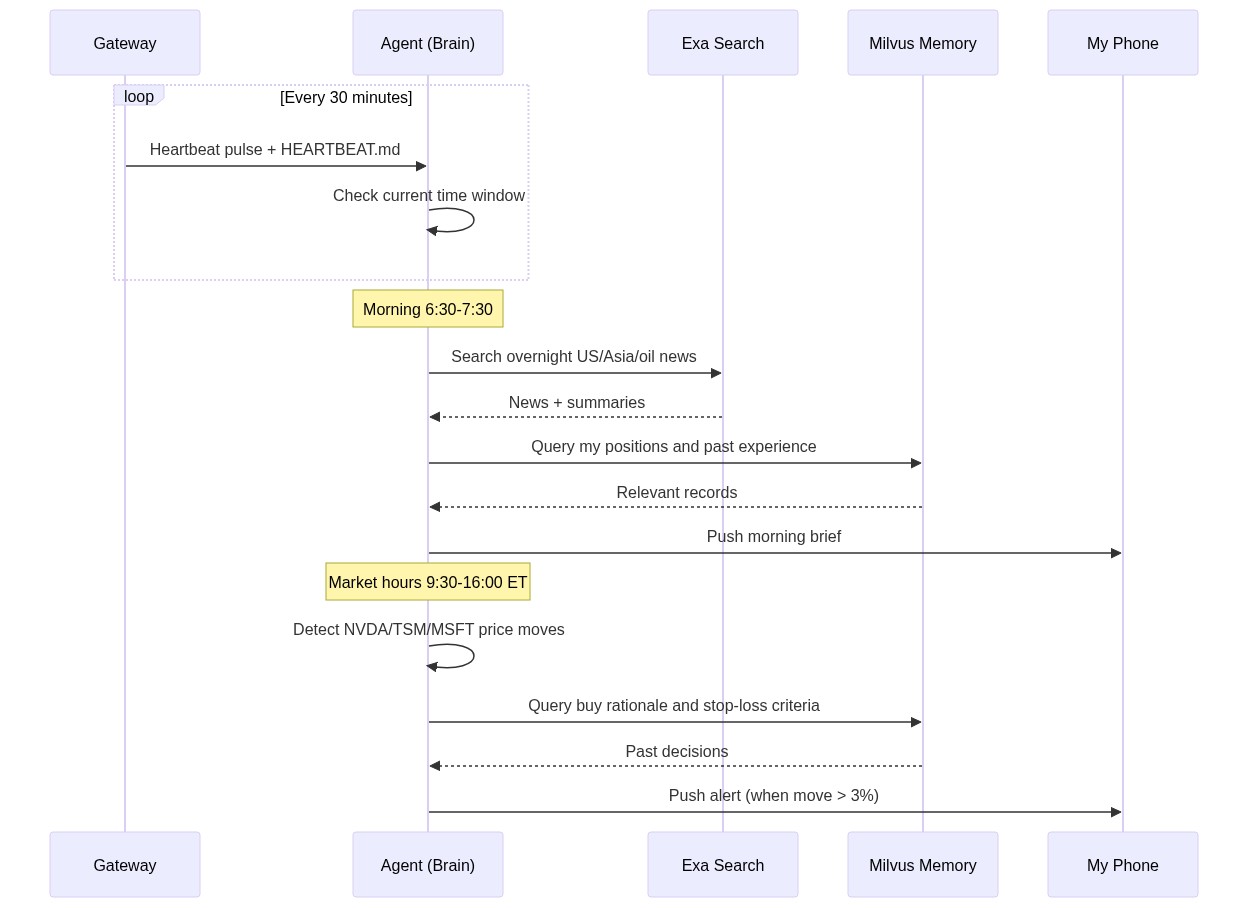
My daily routine now looks like this: I wake up around 7:50 AM, check my phone, and the morning brief is already there. Five minutes to scan it. Then I go to work. During the day, if something unusual happens, the agent sends an alert. On weekends, I spend 30 minutes reviewing the weekly summary. Total time on market tracking: about 2 hours a week, down from 15.
How It All Fits Together
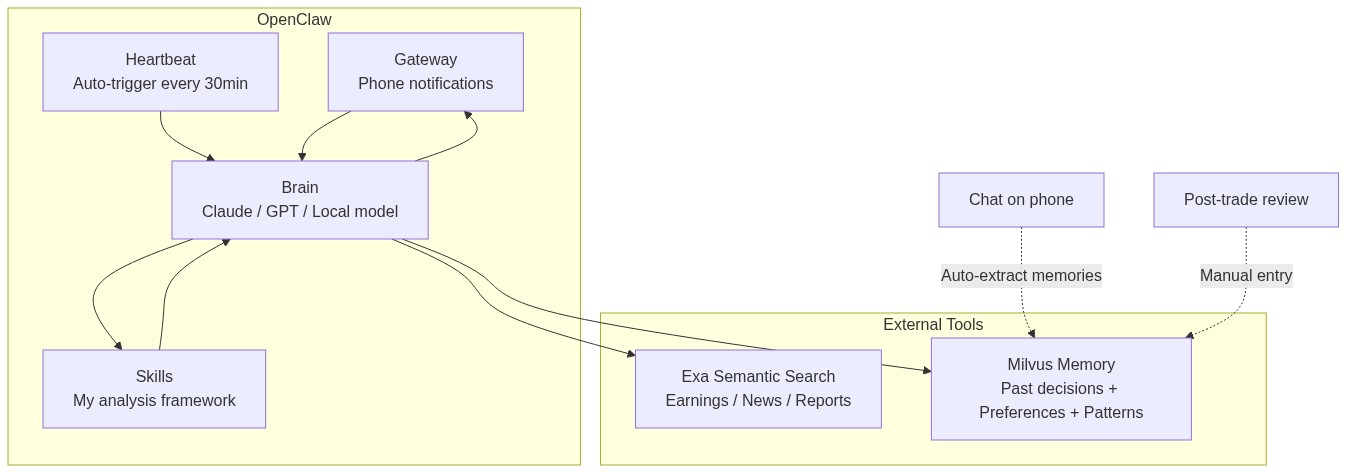
The total cost: Exa API is about $10/month, LLM API calls are about $10/month, and OpenClaw plus Milvus both run locally for free. Around $20/month total.
What Actually Changed
Back to that NVIDIA moment.
Without this system, here’s what would have happened: I’d be working late, see the NVIDIA drop the next morning while rushing to get ready, feel a spike of anxiety, vaguely remember something similar happening before but not the details, and sell just to be safe. A month later, I’d watch the stock recover and regret it.
That exact pattern had played out multiple times before.
Now it’s different. The agent did the analysis while I was asleep. It found my own past notes warning me about panic-selling. When I saw the alert in the morning, I was rested, well-informed, and made the right call: do nothing.
The system doesn’t make decisions for me. It makes sure I have complete information when I make them — including my own past mistakes. For someone who can’t afford to watch the market all day, that’s enough.
Getting Started
If you want to try something like this, it does take some setup. You’ll need to spend a weekend or two figuring out your own trading rules and writing them into markdown files.
But the barrier is lower than you might think. OpenClaw installs in a few commands, Exa has a free tier, and Milvus Lite runs locally without any server setup. Start with the smallest possible goal — “get a market summary on my phone every morning” — and build from there.
The part that surprises me most is the speed of progress. A year ago, building something like this would have taken thousands of lines of glue code. Now it took two weekends. Six months ago, agents could only chat. Now they run scheduled tasks, call external tools, and maintain long-term memory. I’m curious to see where this goes in another six months.
I just used it for stock watching. Swap out the Skills and data sources, and you could monitor research papers, competitors, public sentiment, supply chains — anything that requires persistent attention. Things that used to need a team can now be done by one person and one agent.
Disclaimer: This post shares a personal technical project. All market analysis examples are illustrative and do not constitute investment advice. Investing involves risk; make your own decisions carefully.